
The Fake Perplexity Extension That Quietly Logged Every Search

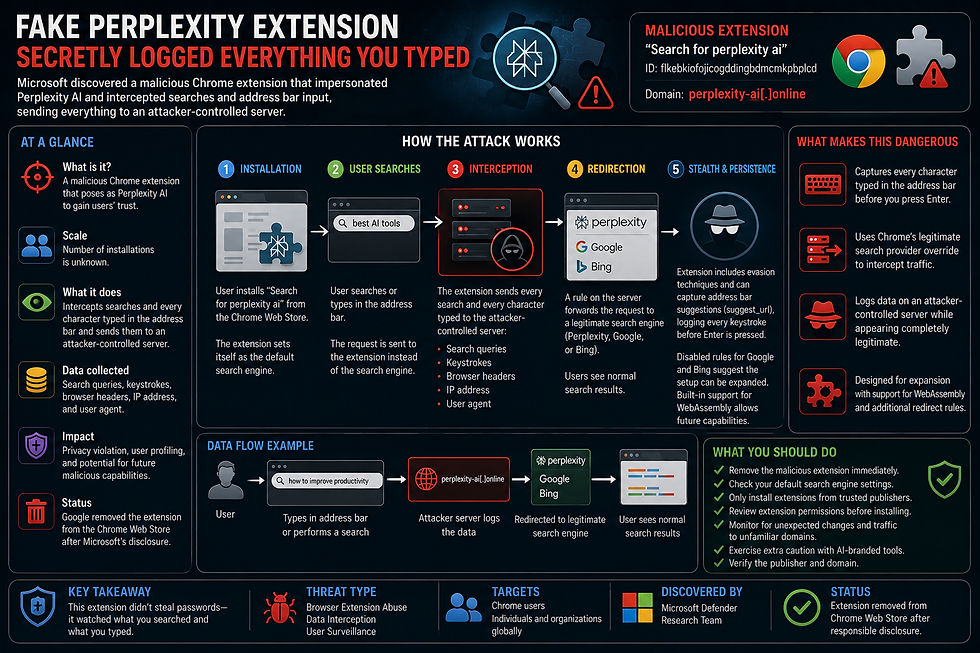
Microsoft has uncovered a malicious Chrome extension that impersonated the AI search engine Perplexity to secretly intercept users’ searches and every character typed into Chrome’s address bar. Instead of stealing passwords, the campaign focused on collecting search activity, browser metadata, IP addresses, and user behavior while redirecting victims to legitimate search results, making the attack almost impossible to notice.
Phase 1 – A Fake AI Tool Gains Trust
The malicious extension, published as “Search for perplexity ai,” used a lookalike domain to imitate the legitimate Perplexity service.
Once installed, it replaced Chrome’s default search provider, exploiting the growing popularity of AI-powered search engines to appear trustworthy and encourage adoption.
Phase 2 – Every Search Is Intercepted
Whenever a user performed a search, the request was first sent to an attacker-controlled server.
Before forwarding the user to Perplexity, Google, or Bing, the server silently logged:
Search queries
Browser headers
IP address
User-Agent information
Because legitimate search results were ultimately displayed, users rarely noticed anything unusual.
Phase 3 – Capturing Every Keystroke
The campaign went even further by hijacking Chrome’s search suggestion mechanism.
Instead of waiting for users to submit a search, the extension transmitted every character typed into the address bar to the attacker’s infrastructure before the Enter key was ever pressed.
This provided attackers with insight into searches users abandoned, partially typed URLs, and browsing intentions that would otherwise never leave the device.
Phase 4 – Built for Expansion
Microsoft also discovered disabled redirect rules prepared for Google and Bing, suggesting the campaign could easily expand to intercept traffic from multiple search providers.
Researchers additionally found support for future WebAssembly (Wasm) execution, indicating the extension had room to incorporate more advanced capabilities beyond simple data collection.
Defense Measures
To reduce the risk of similar attacks:
Remove the malicious extension immediately if installed.
Verify that Chrome’s default search engine has not been modified.
Only install browser extensions from trusted publishers.
Carefully review requested permissions before installation.
Restrict browser extensions through enterprise policies where possible.
Monitor browsers for unexpected search-provider changes and traffic to unfamiliar domains.
Exercise additional caution with AI-branded extensions and always verify the official publisher and website.
Conclusions
This campaign demonstrates that browser extensions remain one of the easiest ways for attackers to collect valuable user data while blending into normal browsing activity.
By abusing legitimate Chrome features rather than exploiting software vulnerabilities, the attackers quietly transformed a fake AI search extension into a large-scale surveillance tool capable of monitoring searches and even individual keystrokes.
As AI-related browser tools continue to grow in popularity, organizations and users alike should treat new extensions with the same level of scrutiny as any other software installation. A familiar brand name alone is no guarantee of legitimacy.


Comentarios